The quick answer
IELTS AI Tutor is an AI IELTS teacher in your browser. Sign up, take one mock test to find your starting band, then practise the skill and question type that cost you the most marks. Each task is timed like the real exam and scored instantly. Open AI Tutor whenever you want a spoken lesson on a strategy. Repeat daily, follow your goals and retake a mock every week or two.
Open IELTS AI Tutor →What is an IELTS AI tutor?
An IELTS AI tutor (people also search for tutor IELTS AI, IELTS tutor AI or AI tutor IELTS) is software that does what a good human tutor does: it sets exam-style tasks, times you, marks your answers against the IELTS criteria, explains your mistakes and tells you what to practise next. It just does it at any hour, as often as you want, and for a fraction of the price.
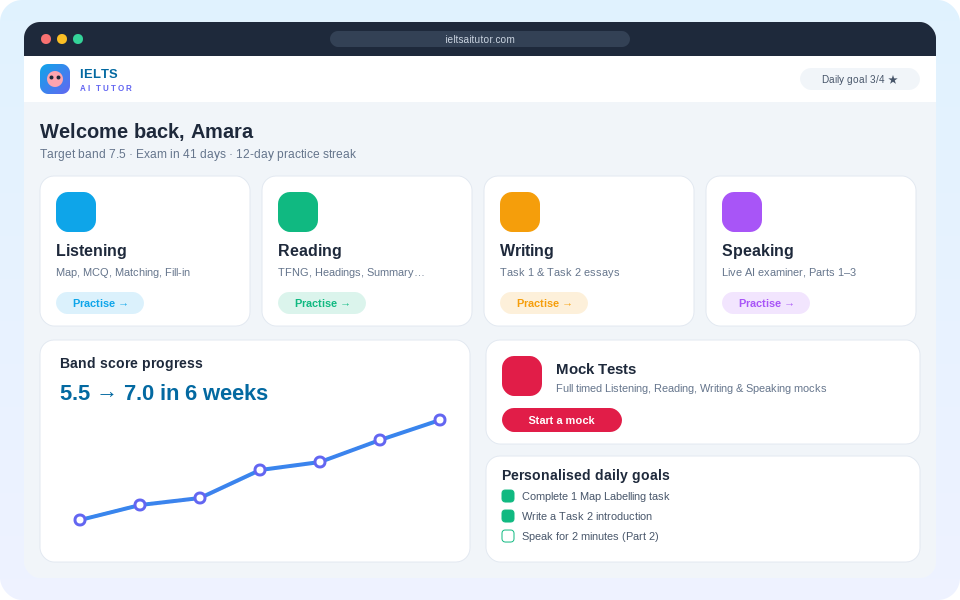
IELTS AI Tutor is built only for IELTS. It is not a general chatbot with an IELTS prompt. Every screen is designed around the real test: Listening with audio and preparation time, Reading passages with the official question types, Writing Task 1 and Task 2 with word counts and criteria-based scoring, Speaking Parts 1–3 with a live AI examiner you talk to, and complete timed mock tests. Think of it as an IELTS AI teacher and practice centre in one place.
10 benefits of learning with an AI IELTS teacher
IELTS AI Tutor vs traditional IELTS preparation
Classes, private tutors and test books still have value. Human teachers are excellent at motivation and nuance. But most candidates struggle with the same three problems: not enough speaking and writing practice, slow feedback, and high cost. Here is how an AI IELTS tutor compares.
| What you need | IELTS AI Tutor | Private tutor / class | Self-study with books |
|---|---|---|---|
| Availability | 24/7, any device | Fixed lesson times | Any time |
| Writing feedback | Instant, on all 4 criteria | Days later, limited essays | None (model answers only) |
| Speaking practice | Live AI examiner, unlimited | A few minutes per lesson | Speaking alone, no feedback |
| Amount of material | Unlimited new tasks | Teacher's materials | Limited to the book |
| Timed mock tests | Built in, auto-scored | Occasional | Manual timing and marking |
| Progress tracking | Automatic score history and goals | Depends on the teacher | Do it yourself |
| Typical cost | From $10 / month | $20–$60+ per hour | $20–$40 per book |
IELTS AI Tutor vs other IELTS AI tutor tools
Search for "IELTS AI teacher" and you will find many tools. Most fall into one of four groups, and each covers only part of the exam.
| Feature | IELTS AI Tutor | General AI chatbots | Essay-checker sites | Speaking-only apps |
|---|---|---|---|---|
| All four skills in one place | ✔ Listening, Reading, Writing, Speaking | Text only | Writing only | Speaking only |
| Real Listening audio and map labelling | ✔ Natural voices, preloaded audio, illustrated maps | ✘ | ✘ | ✘ |
| Live voice examiner | ✔ Parts 1–3, follow-up questions | Varies, not IELTS-structured | ✘ | ✔ |
| Spoken AI lessons (tutor mode) | ✔ In every skill | Typing a prompt yourself | ✘ | Sometimes |
| Exam timers and preparation time | ✔ On every task | ✘ | Rarely | Sometimes |
| Full timed mock tests | ✔ For all four skills | ✘ | ✘ | ✘ |
| Criteria-based band scores | ✔ Writing & Speaking | Inconsistent | ✔ Writing | ✔ Speaking |
| Past questions, daily goals, progress | ✔ | ✘ | Partial | Partial |
In short, a chatbot can talk about IELTS, but it can't run an IELTS test. Single-skill tools leave gaps you have to fill elsewhere. IELTS AI Tutor is designed to be the one AI tutor for IELTS you actually need.
Getting started in 3 minutes
- Try the free demo. Go to ieltsaitutor.com and tap Try Demo in the header. You will speak to the AI tutor for a short live session, with no account needed. You can also try the free writing, speaking, reading and listening samples.
- Create your account. Tap Login/Sign Up and register with email or Google. Your free trial starts immediately, with no credit card needed upfront.
- Find your baseline. Open Mock Tests and complete one timed test in your weakest skill. Note the band. That is your starting point.
- Install it (optional). On a phone, use your browser's "Add to Home Screen" option to open IELTS AI Tutor like an app.
- Allow the microphone when your browser asks. Speaking practice, the live examiner and AI Tutor sessions need it.
Understanding the practice screen
Every practice screen in IELTS AI Tutor shares the same layout, so once you learn one skill you know them all:
- Floating toolbar: the screen title (for example "Listening: Map Labelling") with compact buttons: Home, AI Tutor, Past Qs and New Q. It stays fixed under the header as you scroll. On phones the buttons become large icons with tiny labels.
- Timer: each task shows a labelled countdown such as "Audio starts in", "Reading time", "Writing time" or "Speaking time", with a progress bar that turns orange and red as time runs out. If you scroll past it, a compact copy appears in the toolbar, so you always know how much time is left. Tap it to jump back.
- Submit bar: the main action (Submit Answers, Submit for Evaluation) is pinned to the bottom, so you never have to hunt for it.
- Results pop-up: after submitting you see your score and feedback, and a clear choice of what to do next.
ListeningHow to use Listening practice
Open Listening from the home screen and choose a question type:
- Fill in the Blanks (form and note completion, Part 1 style): names, dates, prices and addresses.
- Multiple Choice: choose A, B or C while following a conversation or talk.
- Matching: match speakers, opinions or features to a list of options.
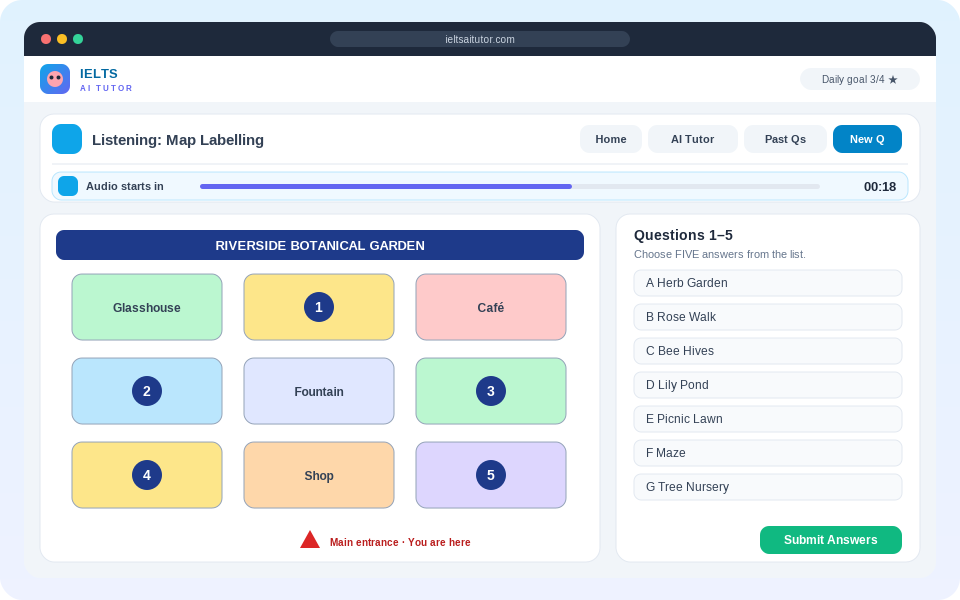
- Map Labelling (Part 2 style): a guide describes a park, campus, museum or building and you label the numbered places on an illustrated map.
Step by step
- Use the preparation time. A countdown ("Audio starts in") gives you time to read the questions, just like the real test. Underline key words and predict the answer type. Meanwhile the audio downloads in the background, and you will see "Audio ready".
- Listen. The audio starts automatically. The play controls sit in the floating toolbar, so you can scroll through questions while you listen. If your connection drops, playback pauses, shows "Buffering" and continues by itself when the network returns.
- Answer as you go. Remember that speakers often correct themselves ("Tuesday, sorry, Wednesday"). Write the final detail.
- Submit. You must listen at least once before submitting. You will see your score and the correct answers.
- Review. Replay the audio after your attempt to hear exactly where you missed an answer. Then press New Q for a fresh task.
Tip: in Map Labelling, find the entrance ("You are here") first and turn the map in your head to face the same way as the speaker. Learn the direction phrases: opposite, next to, at the far end, in the corner. Our IELTS Listening guide explains more strategies.
ReadingHow to use Reading practice
Open Reading and pick from the main IELTS Academic question types:
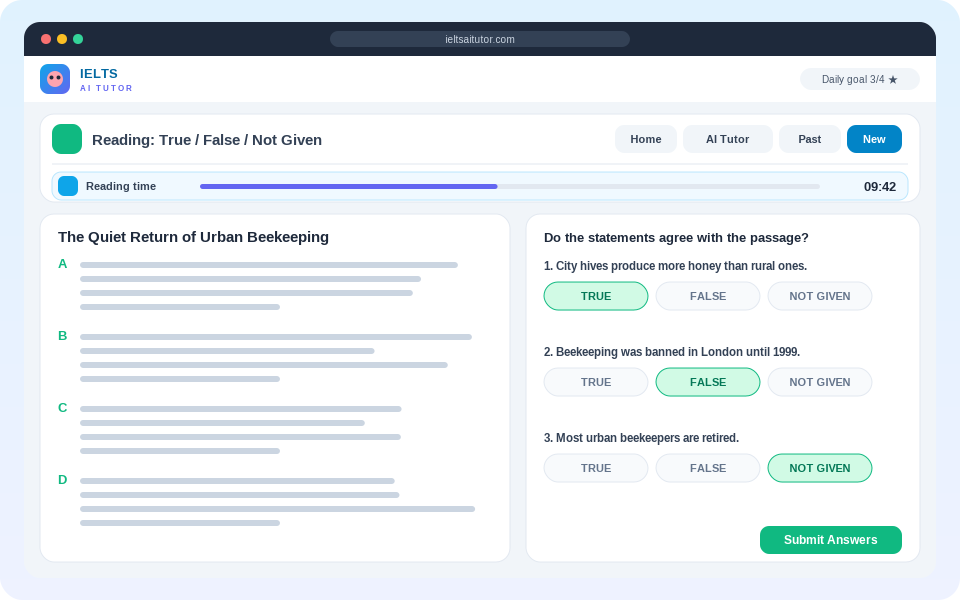
- True / False / Not Given
- Multiple Choice
- Match Headings to paragraphs
- Sentence Completion
- Summary Completion
- Short Answer questions
- Diagram Labelling
Step by step
- Press New for a fresh passage. The Reading time countdown starts, set to match the length of the task.
- Skim the passage for 1–2 minutes, then read the questions and scan for key words and synonyms.
- Answer every question. In True / False / Not Given, "Not Given" means the passage simply doesn't say. Don't use outside knowledge.
- Submit and review which answers were wrong. Return to the passage and find the exact sentence that proves the right answer.
- Open Past to retry passages and see whether you have improved.
Short on time? Do one 10-minute question type a day instead of a full passage. Little and often beats one long weekend session. See the IELTS Reading guide.
WritingHow to use Writing practice
Writing is where an AI IELTS teacher saves you the most time and money, because every essay gets marked straight away.
Step by step
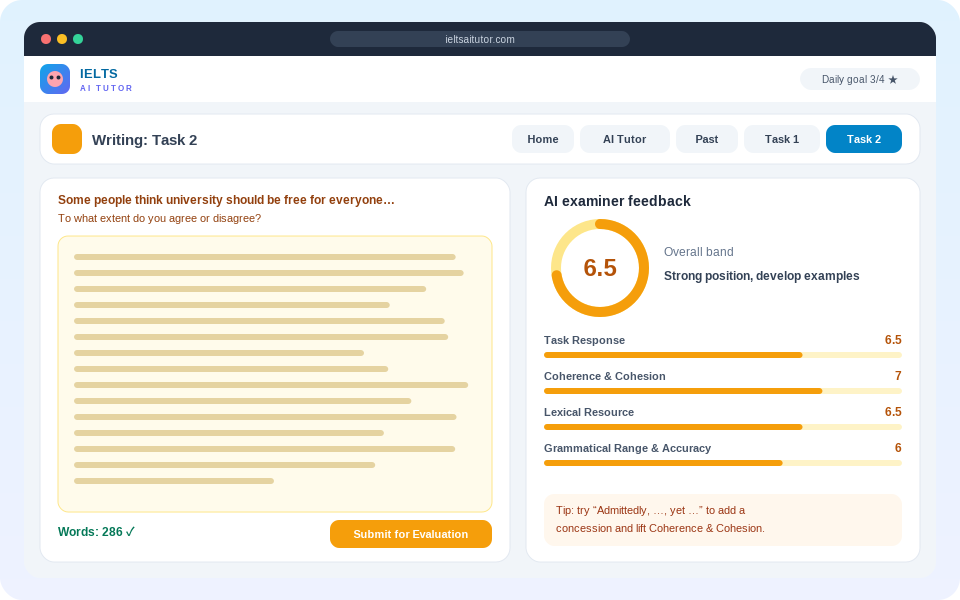
- Choose Task 1 (describe a chart, graph, table, map or process in at least 150 words) or Task 2 (an essay of at least 250 words).
- Read the prompt carefully and spend 3–5 minutes planning. The Writing time countdown follows exam timing (20 minutes for Task 1, 40 for Task 2).
- Write in the editor. The word count updates as you type.
- Press Submit for Evaluation. In seconds you get an overall band plus a score and comments for each criterion: Task Achievement / Task Response, Coherence & Cohesion, Lexical Resource and Grammatical Range & Accuracy.
- Rewrite. This is the secret. Take the feedback, rewrite one paragraph and submit again. Watching one criterion rise is how bands actually move.
Read our IELTS Writing guide for essay structures, or try the free writing demo.
SpeakingHow to use Speaking practice and the live AI examiner
Speaking is the skill learners practise least, because they have nobody to talk to. IELTS AI Tutor solves that with two modes:
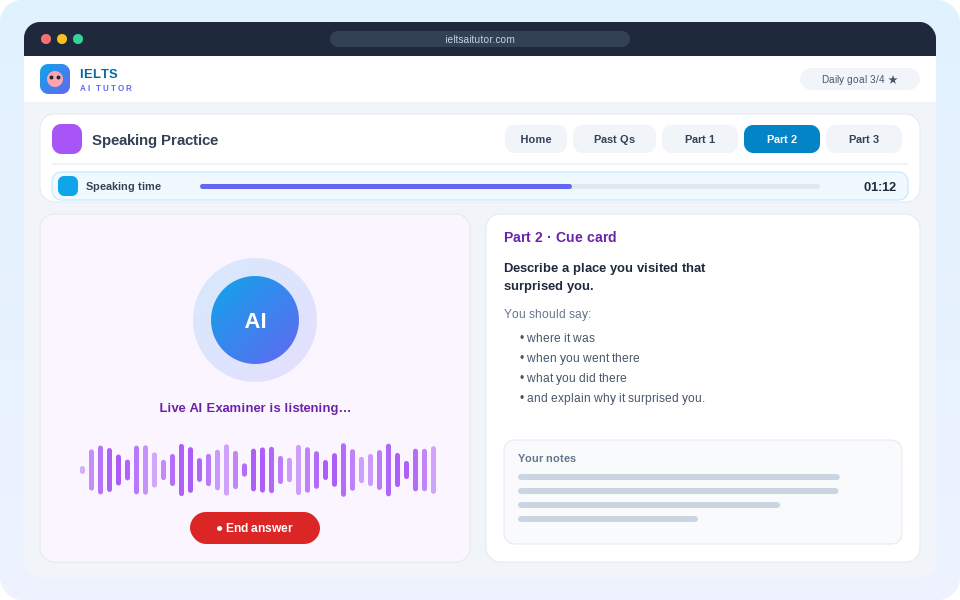
- Standard mode: read or listen to the question, record your answer, and receive a band score with feedback on Fluency & Coherence, Lexical Resource, Grammatical Range & Accuracy and Pronunciation.
- Live mode (Live AI Examiner): a real-time voice conversation. The examiner asks questions, listens, asks follow-ups and moves through the parts, just like the real interview.
Step by step
- Choose Part 1 (familiar topics), Part 2 (cue card long turn) or Part 3 (abstract discussion).
- For Part 2, use the 1-minute Preparation timer to write notes, then press Start Speaking. Aim to talk for the full 2 minutes; the Speaking time countdown shows how long you have left.
- For Parts 1 and 3, press Start Recording and answer naturally. Give a reason and an example, not just "yes" or "no".
- Read your feedback, then answer the same question again using one new phrase or idea from it.
- Once a week, run a full Live mode interview to practise the pressure of a real conversation.
More in the IELTS Speaking guide and the free speaking demo.
AI TutorHow to use the AI Tutor (your IELTS teacher AI)
Practice shows you what you got wrong. The AI Tutor teaches you how to get it right. Press AI Tutor in the toolbar of Listening, Reading or Writing, or start it from Speaking, to begin a live spoken lesson with your IELTS teacher AI.
- Ask it to explain a strategy: "How do I find Not Given answers faster?"
- Ask it to model an answer: "Show me a band 8 introduction for this Task 2 question."
- Ask it to quiz you: "Test me on direction words for map labelling."
- Ask it to explain your result: "Why was my Coherence score only 6?"
When the session ends, a pop-up suggests what to practise next, or you can go straight back home. Use the AI Tutor for 10 minutes before a practice block, then apply the strategy immediately.
MocksHow to use full IELTS mock tests
Open Mock Tests from the home screen to choose a Listening, Reading, Writing or Speaking mock. Mocks are full-length and strictly timed:
- Listening mocks play the timed audio sections part by part.
- Reading mocks give you complete passages under one countdown.
- Writing mocks run Task 1 and Task 2 back to back, with exam timing.
- Speaking mocks run the full interview, including timed Part 2 preparation and speaking.
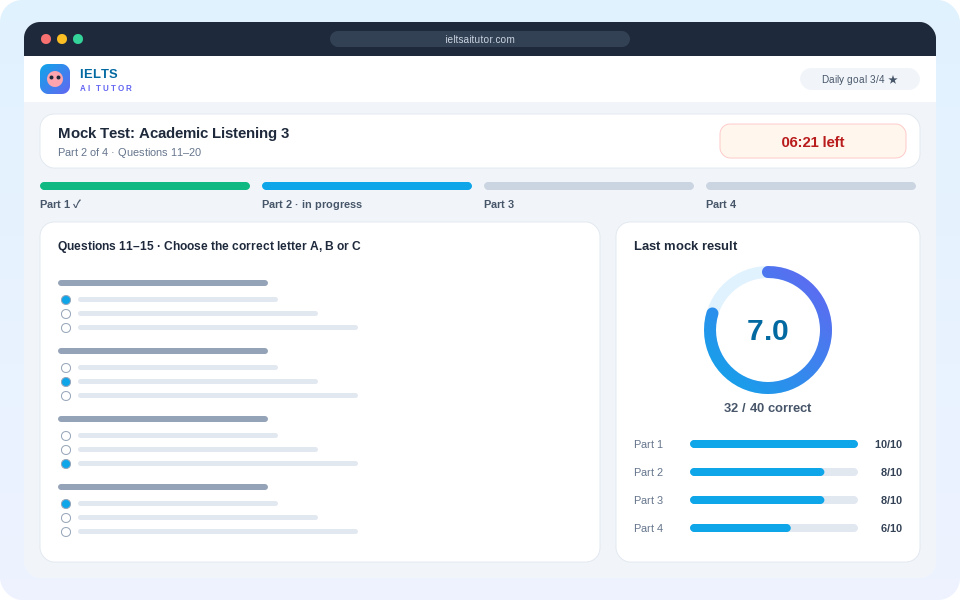
The timer sits in the floating mock bar, so it is visible however far you scroll. When you finish, you see your result and can review every answer. Take your first mock at the start, then one every 1–2 weeks, always in a quiet place and in one sitting, just like test day.
Daily goals, past questions and progress tracking
- Personalised daily goals: small tasks each day (for example "complete one Map Labelling task") keep you consistent. Completing them all earns a bonus.
- Past questions: every task you attempt is saved. Use Past Qs to retry the ones you got wrong, which is one of the most effective study habits there is.
- Progress tracking: your scores are recorded over time, so you can see which skills are rising and which need attention.
A 30-day plan with IELTS AI Tutor
Free trial and pricing
Start with the free demo, then sign up for a free trial, with no credit card required upfront. After the trial, the Monthly plan is $13 per month and the Quarterly plan is $30 every three months ($10 per month, saving 23%). Both include unlimited practice questions, AI feedback and scoring, all mock tests, personalised daily goals, detailed progress tracking and full access to the AI Tutor.
Ready to ace IELTS with smart tools and AI?
Join the learners who practise every day with their own IELTS AI tutor. Try the demo in under a minute.
Frequently asked questions
What is IELTS AI Tutor?
IELTS AI Tutor is an AI IELTS teacher that gives you unlimited Listening, Reading, Writing and Speaking practice, instant band-score feedback, a live AI speaking examiner, spoken AI tutoring and full timed mock tests in one app at ieltsaitutor.com.
Can an AI tutor really help me improve my IELTS band score?
Yes, when you use it consistently. An IELTS AI tutor lets you practise every day, get feedback within seconds on the official criteria and repeat tasks until the mistake disappears. No tool can guarantee a score, but frequent, targeted practice with feedback is the fastest way most learners improve.
Is the IELTS AI teacher free?
You can try a free demo without an account and start a free trial when you sign up, with no credit card required upfront. After the trial, plans start at $10 per month on the quarterly plan.
How is IELTS AI Tutor different from using a general AI chatbot?
A general chatbot has no IELTS timing, audio, task formats or mock tests. IELTS AI Tutor gives you real exam-style tasks with timers, natural audio for Listening, a voice examiner for Speaking, criteria-based scoring for Writing and Speaking, past-question history, daily goals and progress tracking.
Does IELTS AI Tutor work on mobile?
Yes. It runs in any modern browser on phones, tablets and computers, and it can be added to your home screen like an app.
Is it for IELTS Academic or General Training?
Listening and Speaking are the same for both. Reading and Writing practice follows the Academic format, which also builds the skills General Training candidates need.
Official sources & how to use this guide
Check the official IELTS Academic test information, preparation resources and scoring guidance for current test requirements. Screens in this article are illustrations of the IELTS AI Tutor app; the exact layout may differ slightly as the app is updated. AI feedback and practice scores are estimates and cannot guarantee your exam result. IELTS is a trademark of its respective owners; IELTS AI Tutor is an independent preparation tool.